
Download Files Compare – compare files, text comparison, file merger, document comparison, file diff tool
Overview
Files Compare offers a focused and efficient solution for users who frequently work with multiple versions of textual documents. Designed to simplify the process of identifying differences between files, this mobile app serves as a lightweight utility for anyone managing documents across different iterations. Its primary purpose is to enable quick, accurate visual comparison of text-based files, allowing users to pinpoint changes, deletions, and additions with ease. This functionality is particularly valuable for professionals in writing, programming, or administrative roles who need to track revisions without relying on desktop-based tools.
The app targets individuals who require a portable, on-the-go method to analyze file changes, especially when working remotely or in environments where full-featured desktop software is inaccessible. While the developer, Jason A. Bilbrey, is credited with the creation of the app, no additional background or company affiliation is provided. The app’s release date, October 26, 2005, suggests a long-standing presence in the mobile productivity space, indicating stability and continued relevance despite its age.
Real-world use cases include comparing drafts of reports, tracking code changes in small scripts, or verifying updates in configuration files. In the broader app ecosystem, Files Compare fills a niche for minimalistic, no-frills tools that prioritize functionality over complexity. Its lightweight design and free access make it accessible to users across varying technical skill levels, reinforcing its role as a dependable utility in daily workflows.
Key Features & Functionality
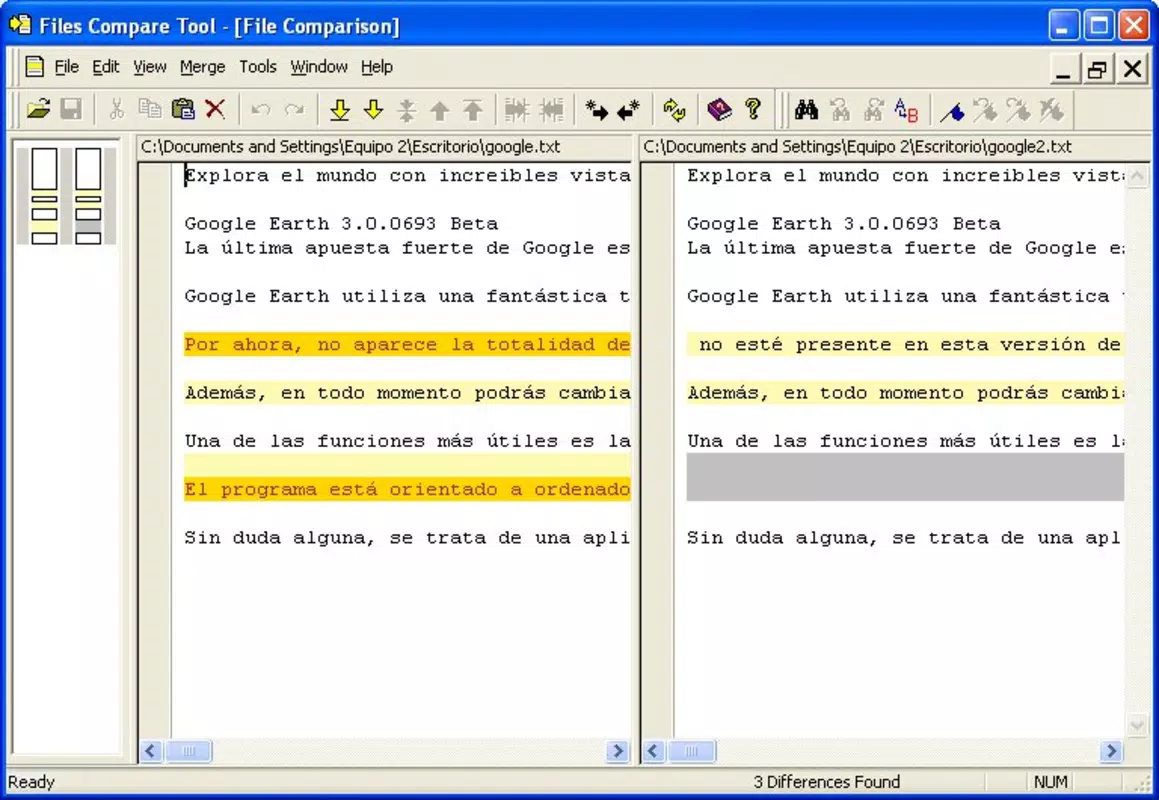
- Visual Comparison: Files Compare uses a side-by-side, color-coded interface to display differences between two text files. This visual approach enables users to instantly identify changes, such as added or removed lines, without needing to manually scan through content.
- Powerful Editing Engine: The app includes an integrated editing engine that allows users to merge selected changes directly within the interface. This feature reduces the need for external tools and streamlines the revision process.
- Easy File Selection: Users can initiate a comparison by selecting two files from their device’s storage. The app then loads both files simultaneously, highlighting discrepancies in real time for immediate review.
- User-Friendly Interface: The layout is designed for intuitive navigation, with minimal clutter and clear visual cues. Even users with limited technical experience can operate the app effectively.
- Modification Capability: After comparison, users can edit the files directly within the app to resolve differences, adjust content, or finalize documents based on their preferences.
For example, a writer reviewing two versions of a manuscript can quickly spot revisions, decide which version to keep, and merge improvements without switching tools. Similarly, a developer checking small configuration updates can verify changes before deployment. These practical applications highlight the app’s value in real-world scenarios where speed and clarity are essential.
Interface, UX & Performance
The user interface of Files Compare is clean and purpose-driven, emphasizing clarity over decorative elements. The side-by-side layout ensures that both files are visible at once, with differences highlighted using distinct colors—typically red for deletions and green for additions—improving readability. Navigation is straightforward, relying on standard touch interactions such as tapping and swiping, which enhances accessibility across different device sizes.
Although the developer did not list formal performance metrics, the app’s small file size of 1.3 MB suggests a lightweight design optimized for efficiency. This likely contributes to fast loading times and minimal resource consumption, making it suitable for older or low-end Android devices. Responsiveness appears consistent based on its long-standing functionality, though no specific benchmarks were provided.
Stability is implied by the app’s release date and continued availability, indicating a reliable core operation. However, the lack of recent updates or modern design refinements may affect the user experience on newer Android versions. The absence of detailed information about compatibility with current OS versions means users should exercise caution when installing on devices running recent Android releases.
Platform Compatibility & Technical Requirements
Files Compare is available exclusively on the Android platform. The app requires Android as the operating system, though specific minimum version requirements were not listed by the developer. The file size is 1.3 MB, which is notably small and suggests minimal storage demands. This makes it suitable for devices with limited space or older hardware.
The app’s version is listed as 1.0, which may indicate a stable release or a minimal update cycle. No additional technical specifications such as RAM requirements or processor compatibility were provided. The developer did not specify whether the app supports tablet devices or foldable screens, nor was there information on cloud integration or file format support beyond text files.
Compatibility information was not fully disclosed, so users should verify functionality on their specific device before installation. The absence of detailed system requirements means that performance on newer Android versions remains uncertain.
Pros and Cons
Pros
- Free to download and use, making it accessible to all users.
- Lightweight design with a small file size of 1.3 MB.
- Simple, intuitive interface suitable for non-technical users.
- Efficient visual comparison with color-coded differences.
- Direct editing and merging capabilities within the app.
Cons
- Version 1.0 suggests limited or no recent updates.
- Developer did not provide detailed compatibility or system requirements.
- App may not be optimized for newer Android versions or larger screens.
- Only supports text files; no mention of other formats like PDF or DOCX.
- No cloud sync or file sharing features were listed.
FAQ
Is Files Compare safe to install on Android?
The app is available through official channels and does not require root access. However, users should ensure they download it from a trusted source to avoid potential security risks.
Can I compare PDF or DOCX files with Files Compare?
Based on the provided information, the app is designed for text-based files only. No support for PDF, DOCX, or other document formats was mentioned.
Does Files Compare support automatic updates?
The developer did not specify whether the app includes an automatic update feature. Users may need to manually check for updates through the app store.
Is the app available for iOS devices?
Files Compare is currently available only for Android. There is no indication of an iOS version at this time.
Can I use Files Compare offline?
Yes, the app functions without an internet connection, making it suitable for use in environments with limited or no connectivity.
Final Thoughts + CTA
Files Compare remains a reliable, no-frills tool for users who need to compare and merge text files on their Android devices. Its simple design, visual clarity, and direct editing capabilities make it a practical choice for professionals and individuals managing document revisions. While its age and lack of modern updates may raise compatibility concerns, its core functionality continues to deliver value in specific use cases.
Those who work with plain text files—writers, developers, or administrators—will benefit most from its straightforward approach. The app’s free status and minimal system requirements enhance its accessibility, especially for users with older devices or limited storage.
Despite its limitations, Files Compare holds a unique place in the productivity app landscape as a dedicated, lightweight utility. For anyone needing a quick, secure, and efficient way to compare text files on a smartphone, this app is worth considering.
Download Files Compare now


